



Give first-time customers a reason to come back.

A branded loyalty card in Apple & Google Wallet — no app to download.

  • Works withApple Wallet
  • Works withGoogle Wallet
Customer journey

From the first visit to the next one.

Customers join in a couple of minutes; the card stays on their phone and works on every visit.

  1. Scan the QR code

    A QR code on the table, counter or menu opens your sign-up page.

  2. Register

    They enter their name and phone and confirm with an SMS code.

  3. Save the card

    The branded card goes into Apple Wallet or Google Wallet; a web card is always available too.

  4. Earn points

    Points from purchases appear on the card, which updates automatically.

  5. Redeem rewards

    On a future visit they turn points into a reward.

What do staff do?

A few seconds at the till. Rules and calculations live in the system.

With a POS integration
The customer is recognised at the till and points arrive automatically from the POS purchase.
Without a POS integration
Staff find the customer in the dashboard by QR code, card number or phone and enter the amount; points follow your rules.
Redeeming rewards
Staff reserve the points and the customer confirms with an SMS code on the web card. Unconfirmed requests are released when they expire.
Refunds
Points from a refunded purchase are reversed; every movement is recorded.
Business benefits

Not just a card — a repeat-visit system.

The card, customer data and offers work in one place.

  • Your brand and rules

    Your logo, colours and card design. You set the points rate and the rewards.

  • Know your customers

    A profile, visit and points history for every member. Separate new, returning and lapsed customers.

  • Give them a reason to return

    Rewards and offers show on the card; opted-in customers get a Wallet notification reminder.

  • Measure the results

    The dashboard shows new members, loyalty activity, redeemed rewards and purchase volume.

Industries

Who is a loyalty program a good fit for?

Four ways to reward repeat customers. We’ll confirm setup and integration options with your business.

  • Restaurants and cafés

    Let guests earn points on orders and use them for rewards on later visits.

  • Beauty and wellness

    Give regular clients a reward they can use at their next appointment.

  • Fitness and sports

    Let members earn points on studio purchases or extra services.

  • Retail and services

    Turn spending on goods or services into points customers can use on their next visit.

Product walkthrough

Look inside the business dashboard.

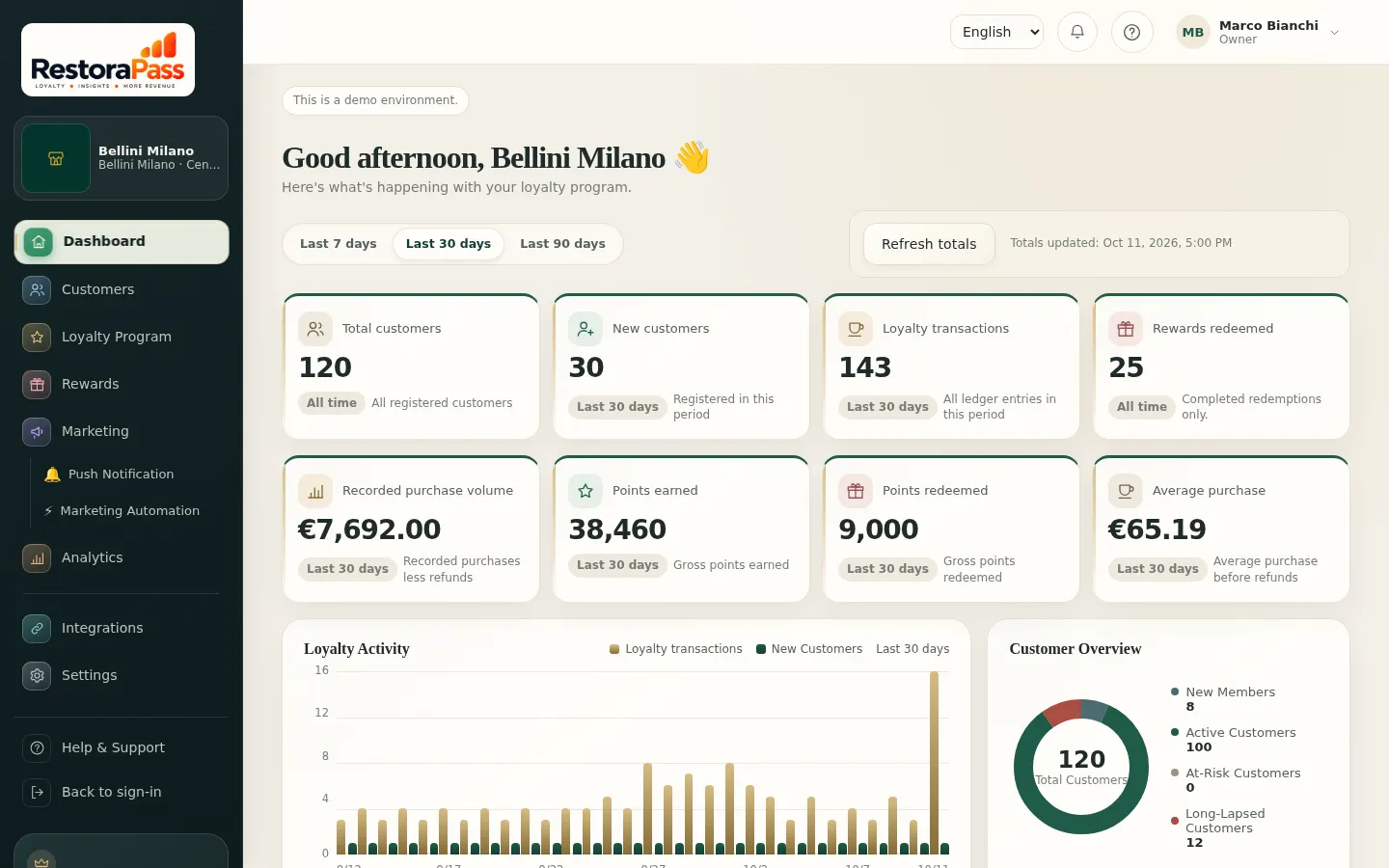
Customers, rewards and results in one dashboard.

Overview screen in the RestoraPass dashboard
Total and new customers, loyalty activity, redeemed rewards and purchase volume on one screen.
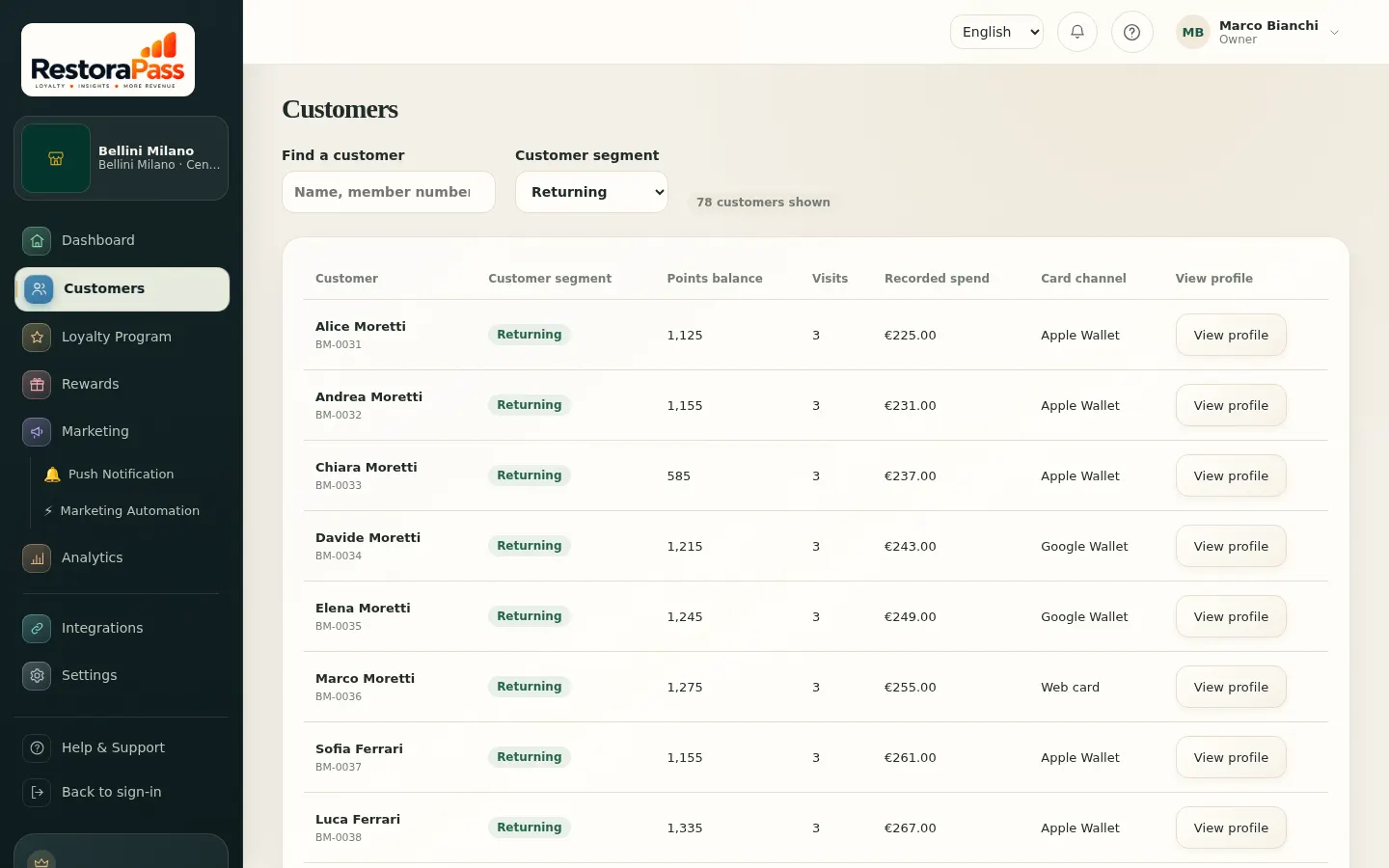
Customer list filtered to returning customers in the RestoraPass dashboard
The customer list, filtered by new, returning and at-risk segments.
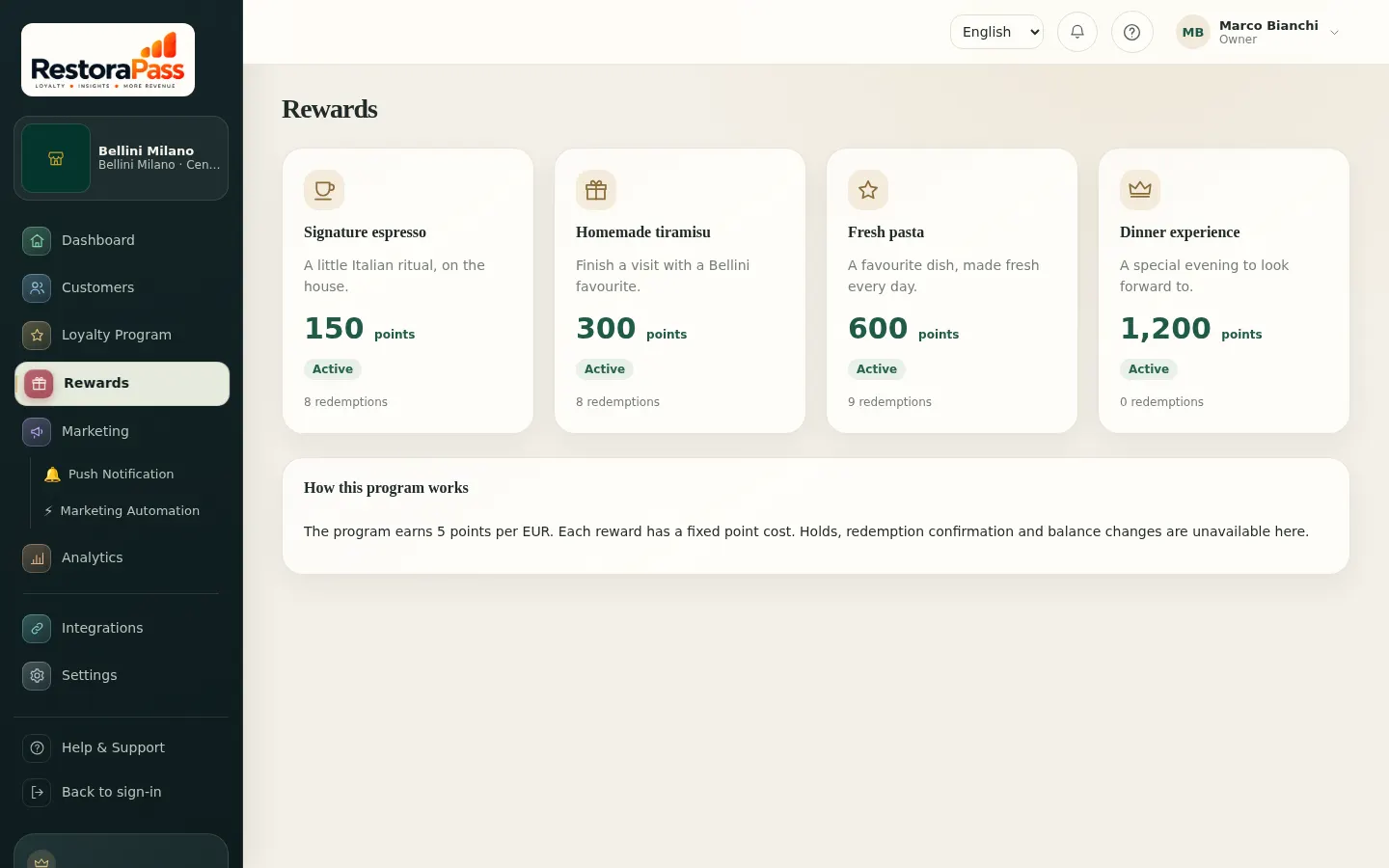
Reward catalogue in the RestoraPass dashboard
The reward catalogue: points cost, status and the rewards customers see on their card.
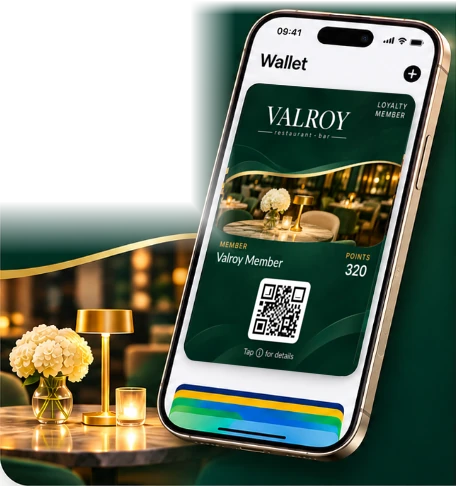
Valroy loyalty card in Apple Wallet
Almaty, Kazakhstan Live
Industry
Restaurant · bar
Went live
November 2026
POS
iiko
Card
Apple Wallet ·
Google Wallet · web
Customer story

Valroy, Almaty: live with iiko.

A seamless RestoraPass loyalty experience, connected to Valroy’s iiko setup.

  • Connected to iiko

    Works with Valroy’s existing setup.

  • Automatic loyalty

    Points are calculated in iiko.

  • Always up to date

    Balance and transactions sync to the card.

  • Valroy branded

    A digital card with Valroy’s logo and colours.

How it works at Valroy

  1. Scan QR
  2. Add to Wallet
  3. Earn Points
  4. Get Rewards
Talk to us about a similar setup
Integrations and launch

See clearly what is ready.

What is live, what is connected during setup and what needs custom development.

Live

iiko

Live at Valroy since November 2026. Supported operations:

  • Find or create the iiko customer by phone at sign-up
  • Points calculated in iikoFront with the venue's rules
  • iiko balance and movements shown on the card and in the dashboard
  • RestoraPass does not change data in iiko

Apple Wallet and Google Wallet

Adding the card and updating it automatically when the balance changes.

Connected at setup

New iiko connections

Each new venue's iiko connection is configured and verified during setup, before going live.

Custom development

Other POS, CRM, booking and membership systems

Built after discovery and a quote. Scope and timing depend on the system.

You can start without a POS integration: staff record purchases in the dashboard.

How to launch

  1. Intro callWe walk through the customer experience and the dashboard together.
  2. Setup decisionsPoints and reward rules, locations and any integration needs are agreed.
  3. Card and teamWe prepare the branded card and QR materials and train your staff.
  4. Launch and follow-upThe programme goes live; we monitor and adjust together in the first weeks.
Pricing

How pricing is built

Instead of fixed packages, we quote for your business. A quote is made up of:

1

One-time setup

Card design, programme rules, dashboard setup, QR materials and staff training.

2

Monthly subscription

The platform, business dashboard, Wallet cards, updates and support. No limit on customers or cards.

+

Extra charges

Only when needed: custom integration work, a dedicated service level (SLA) and SMS usage. Listed separately in the quote.

What affects the quote

  • Number of locations
  • POS integration
  • Features you need
  • Training and support scope
Get pricing
FAQ

Frequently asked questions

What is RestoraPass?

A digital loyalty platform for businesses: a branded card, customer profiles, rewards and a business dashboard. The card works in Apple Wallet, Google Wallet or on the web.

Do customers need to download an app?

No. Customers scan a QR code, register and add the card to their phone's wallet.

Can we use it without a POS system?

Yes. Staff find the customer in the dashboard and enter the purchase amount; points follow your rules.

Does it work with iiko?

Yes, the iiko integration is live at Valroy in Almaty. iikoFront calculates points with the venue's iiko rules and the balance shows on the card. Each new iiko connection is verified before it goes live.

Can we use our own brand and rules?

Yes. The card uses your logo and colours; you set the points rate and the rewards.

How are redemptions protected?

Staff reserve the points and the customer confirms with an SMS code on the web card. The card's QR code contains no phone number or balance.

Can we see the dashboard before buying?

Yes. Explore the dashboard yourself, or talk to us to plan your launch.

Contact

We'll get back to you.

Three fields are enough. We'll cover technical details in a follow-up call.

  1. Understand your needs

    Talk through your business goals and customer base.

  2. Shape the right programme

    Review rewards, your brand and the systems you use.

  3. Agree on next steps

    Set a clear scope and launch plan together.

Would you prefer to email us? info@restorapass.com Message us on WhatsApp: +7 701 842 90 93 Call

Tell us about your business

Let's find the right solution for you

Leave your details and we'll pass your request to our team.

Topic: intro call

Thank you! We've received your request and will be in touch soon.

Meet RestoraPass Customer experience and business dashboard
Talk to us